

Table of Contents
- Introduction: The Multi-Screen Era of 2026
- Crucial Difference: Installation vs. Simultaneous Connections
- The “IP Lock” Nightmare: Why Cheap Services Fail
- How to Watch on Multiple Devices Without Getting Banned
- Bandwidth Realities: Do You Have Enough Speed?
- Best Apps for Multi-Screen Viewing (TiviMate & Smarters)
- Can I Share My Account with a Friend?
- Cost Comparison: Single vs. Multi-Room Plans
- Frequently Asked Questions (2026 Edition)
- Verdict: How to Get the Best Family Setup
It’s a Saturday evening in 2026. The big football match is on. You want to watch it on the big screen in the living room. Your partner wants to catch up on a series in the bedroom, and the kids are demanding their cartoons on an iPad. In the old days of cable TV, this required expensive multi-room boxes and messy wiring.
Today, with IPTV, it should be simple, right? You just download the app and hit play.
But then, disaster strikes. You turn on the bedroom TV, and the living room TV suddenly cuts to black. Or worse, you get an error message: “Maximum Connections Reached.”
Can I use IPTV on multiple devices in 2026? The answer is YES, but it is not automatic. It depends entirely on your subscription plan and your provider’s “IP Lock” policies.
In this guide, I will explain exactly how multi-device IPTV works, why your account might get banned if you do it wrong, and how to set up a seamless multi-room system for your entire family using our premium services.
Crucial Difference: Installation vs. Simultaneous Connections
This is the #1 misunderstanding that leads to frustration. To master IPTV in 2026, you must distinguish between two concepts:
1. Device Installation (Unlimited)
You can install your IPTV credentials (M3U Link or Xtream Codes) on as many devices as you own. You can put it on your iPhone, your Android TV, your PC, your Firestick, and your tablet. There is typically no limit to installation.
2. Simultaneous Connections (Limited)
This is where the limit exists. A “Simultaneous Connection” refers to how many devices are streaming video at the exact same time.
- Standard Plan: Usually 1 connection. (If you turn on TV #2, TV #1 stops).
- Family Plan: Usually 2-4 connections.
- Reseller/Premium: Can be customized.
 Don’t Fight Over the Remote!
 Most cheap providers strictly limit you to 1 screen to save server costs.
Upgrade to our Multi-Room Family Plan today and get up to 5 simultaneous connections with zero buffering. Perfect for large households.
The “IP Lock” Nightmare: Why Cheap Services Fail
If you have ever tried to use your IPTV subscription at a friend’s house or while traveling, you might have found it didn’t work. This is called IP Locking.
In 2026, security is tighter than ever. Many low-quality providers lock your subscription to the first IP address that connects. If you connect your TV at home (IP Address A), and then try to connect your phone via 4G (IP Address B), the server thinks your account is being stolen and blocks it instantly.
Why do they do this? To prevent people from buying one account and sharing it with 50 friends.
The Solution: You need a provider with “Travel-Friendly” or “IP Unlocked” technology. Our service allows for dynamic IP usage (within reasonable limits), meaning you can watch on your phone while commuting without getting banned.
How to Watch on Multiple Devices Without Getting Banned
If you want a true multi-device experience, follow these rules to avoid account suspension:
Scenario A: Inside the Same House
If all your devices (TVs, Phones, Tablets) are connected to the same Wi-Fi router, they share the same external IP address.
Risk Level: Low.
Requirement: You just need a subscription that supports multiple connections (e.g., a “2 Connections” plan) to stream on two TVs at once.
Scenario B: Different Locations (e.g., You at home, Kids at college)
This involves two different IP addresses.
Risk Level: High (for cheap providers).
Requirement: You need a premium provider that allows “Dual IP Usage” or you need to set up a VPN to make both locations appear as one (complicated). The easier route is simply choosing a high-quality service like ours that permits flexible usage.
Bandwidth Realities: Do You Have Enough Speed?
Watching on multiple devices sounds great until the internet crashes. Streaming in 2026 is data-intensive.
- 1 SD Stream: ~3 Mbps
- 1 HD Stream: ~8 Mbps
- 1 4K Stream: ~25 Mbps
If you have a “3 Connection” plan and three people are watching 4K movies at the same time, you need a stable speed of at least 75-100 Mbps. If your internet is slower than this, you will experience buffering, regardless of how good the IPTV server is.
Best Apps for Multi-Screen Viewing (TiviMate & Smarters)
Hardware is one thing, but software is where the magic happens. In 2026, the best apps for managing multiple devices are:
1. TiviMate (Android/Firestick)
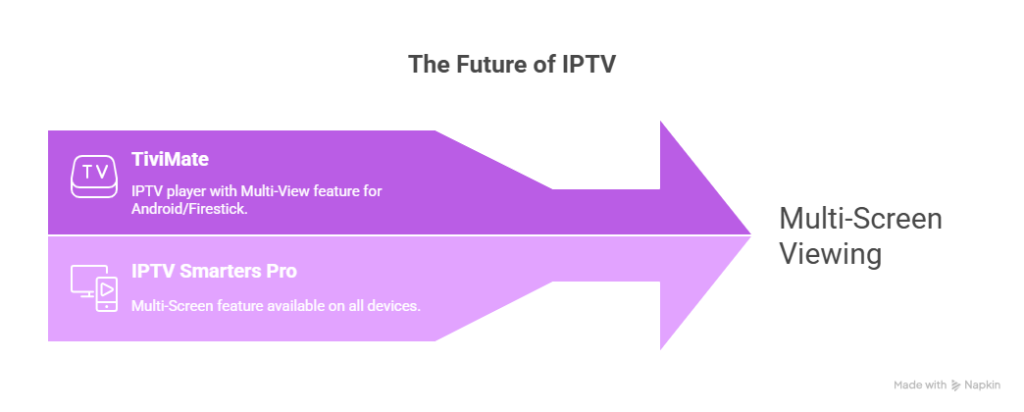
The undisputed king of IPTV players. TiviMate allows “Multi-View.” This feature lets you split your TV screen into 4 smaller screens, watching 4 different channels simultaneously from one device.
Note: This consumes 4 connections from your subscription!
2. IPTV Smarters Pro (All Devices)
Great for syncing. Smarters has a “Multi-Screen” feature similar to TiviMate. It is also available on Apple and Smart TVs, making it a great choice for mixed-device households.
Can I Share My Account with a Friend?
This is the most common question we get.
“I bought a 2-connection plan. Can I give one connection to my friend who lives across town?”
Technically: Yes, if your provider does not IP Lock.
Practically: It is risky. If both of you reset your routers or change networks frequently, the server might flag the account for “suspicious activity” (hopping between IPs too fast).
Our Recommendation: It is safer and more stable to buy two separate single-connection accounts or a specifically designed “Reseller/Family Package” that authorizes multiple IP addresses. Contact our support to ask about our “Buddy Plans.”
Cost Comparison: Single vs. Multi-Room Plans
Is it worth upgrading? Let’s look at the numbers for a typical setup in 2026.
| Service Type | Number of Devices | Monthly Cost (Approx) | Flexibility |
|---|---|---|---|
| Traditional Cable TV | 3 Rooms | $120 – $180 | Low (Hardwired) |
| Standard Streaming (Netflix/Hulu) | 3 Screens | $45+ (Combined) | Medium |
| Cheap IPTV (Single Connection) | 1 Screen (Risk of Ban if shared) | $10 | Very Low |
| Premium IPTV Multi-Room (Our Service) | Up to 5 Screens | $15 – $25 | High (Any Device) |
As you can see, upgrading to a multi-connection IPTV plan is still fractionally cheaper than cable or stacking official streaming services.
Frequently Asked Questions (2026 Edition)
1. If I buy 2 connections, can I watch on my phone and TV at the same time?
Yes! This is the standard use case. You can watch football on the TV while your partner watches a movie on the iPad on the same network.
2. Does using a VPN help with multi-device usage?
Yes. A VPN can mask your IP address. If you connect both devices to the same VPN server location, the IPTV provider sees them as coming from one place, bypassing potential IP locks. However, this requires a fast VPN.
3. Can I use my subscription on Smart TV and Firestick?
Yes. The type of device doesn’t matter. You can mix and match (e.g., Samsung TV + iPhone + Firestick). The limit is only on how many are on at once.
4. What happens if I accidentally open a 3rd screen on a 2-screen plan?
Usually, the oldest active stream will cut off, or the new device will fail to connect. In some strict cases, the account might be temporarily suspended for 30 minutes.
Verdict: How to Get the Best Family Setup
Using IPTV on multiple devices in 2026 is the best way to save money while keeping the whole house entertained. The days of fighting over the remote are over.
The Golden Rules:
- Count your screens: Be realistic. If you have 4 people in the house, don’t buy a 1-connection plan. It will cause conflicts.
- Check your speed: Ensure you have at least 50-100 Mbps internet.
- Choose a flexible provider: Avoid the cheapest $5 sellers. They will ban you for using your phone on 4G.
Get the Ultimate Family Entertainment Package
Why limit yourself? Our Premium Multi-Room Plans allow up to 5 Simultaneous Connections with no IP Locking issues within the same household.
Watch Sports, Kids’ Shows, and Movies in different rooms at the same time.
 Upgrade to Family Plan & Save 30%
Compatible with all devices | 4K Quality | 99.9% Uptime