

Table of Contents
- Introduction: The Apple TV Powerhouse
- The Big Hurdle: Apple TV vs. Android (No Sideloading?)
- The Best IPTV Apps for Apple TV in 2026
- Step-by-Step: Installing Smarters Player Lite
- The Premium Choice: TiviMax (The TiviMate of iOS)
- Method 2: AirPlay (The Wireless Solution)
- Why Quality Matters More on Apple TV
- Frequently Asked Questions (2026 Edition)
- Verdict: Is Apple TV Good for IPTV?
You have invested in an Apple TV 4K. It’s arguably the most powerful streaming device on the market in 2026. The interface is buttery smooth, the remote is premium, and the picture quality is unmatched. But now comes the big question:
Can I install IPTV on Apple TV?
For years, IPTV users shied away from Apple because it was seen as a “walled garden.” Android devices (like Firestick or Shield) were preferred because you could install anything. But things have changed.
In 2026, Apple TV is actually one of the BEST ways to watch IPTV—if you know which apps to use. You don’t need to “jailbreak” your device or use complicated hacks anymore. You just need the right software and a high-quality subscription.
The Big Hurdle: Apple TV vs. Android (No Sideloading?)
Before we get to the “How-To,” we must address the elephant in the room. Unlike Android, you cannot easily “sideload” apps on Apple TV.
- On Firestick: You use the “Downloader” app to install any APK file from the web.
- On Apple TV: You are mostly limited to what is available in the official App Store.
This sounds like a disadvantage, but it’s actually a blessing in disguise. The apps allowed on the App Store are generally safer, more stable, and better optimized for the hardware. You won’t find buggy, virus-ridden apps here.
The Best IPTV Apps for Apple TV in 2026
Forget about the old, clunky apps of the past. If you want to watch live TV on your Apple device, these are the heavy hitters you should be looking for:
| App Name | Price | Best Feature | Verdict |
|---|---|---|---|
| Smarters Player Lite | Free / Paid | User Friendly | The “Standard” Choice |
| TiviMax | Paid (Premium) | UI like TiviMate | Best Overall Experience |
| iPlayTV | Paid | Modern Design | Great for minimalistic look |
| GSE Smart IPTV | Free / Paid | Advanced Tools | Good for experts |
Step-by-Step: Installing Smarters Player Lite
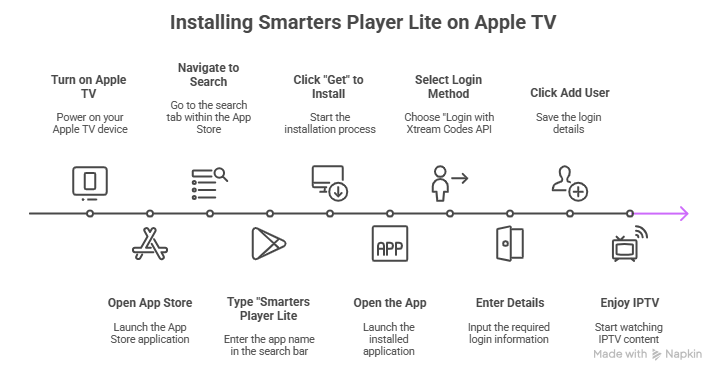
“IPTV Smarters” is the most famous name in the industry. On Apple TV, it is often branded as “Smarters Player Lite” to comply with Apple’s naming policies. Here is how to set it up:
- Turn on your Apple TV and open the App Store (blue icon with an “A”).
- Navigate to the Search tab.
- Type “Smarters Player Lite”.
- Click “Get” to install it.
- Open the app. You will be asked to input your details.
- Select “Login with Xtream Codes API” (This is the easiest method).
- Enter the details sent by your provider:
- Name: (Any name, e.g., “My TV”)
- Username: (From your email)
- Password: (From your email)
- URL: (The server URL from your email)
- Click Add User and enjoy!
Get your instant access credentials here for the best sports and movie experience on Apple TV.
The Premium Choice: TiviMax (The TiviMate of iOS)
If you are coming from Android, you probably miss TiviMate. It is widely considered the best IPTV player ever made, but it is not available on Apple.
Enter TiviMax. This is an app built specifically for Apple TV in 2026 that looks, feels, and functions almost exactly like TiviMate.
- Why it’s great: It supports Multi-View (watching 4 channels at once), auto-frame rate matching (crucial for smooth sports), and a stunning EPG (TV Guide).
- The Catch: It usually costs a few dollars as a one-time purchase, but for an Apple TV user, it is worth every penny.
Method 2: AirPlay (The Wireless Solution)
Sometimes, you might find an app on your iPhone that isn’t available on the Apple TV (or you just find it easier to type on your phone). This is where the Apple Ecosystem shines.
How to use AirPlay for IPTV:
- Download an IPTV app on your iPhone or iPad (e.g., LillyPlayer, IPTVX).
- Login to your subscription on the phone.
- Start playing a channel.
- Swipe down from the top-right corner to open the Control Center.
- Tap the Screen Mirroring icon (two rectangles) or the AirPlay icon within the video player.
- Select your Apple TV 4K.
The video will instantly jump to your TV. Because Apple’s AirPlay 2 protocol is so advanced in 2026, there is almost zero lag, and the quality remains pristine.
Why Quality Matters More on Apple TV
This is a critical point that many users overlook. The Apple TV 4K is designed to upscale content and display it on high-end televisions (OLED, QLED). It reveals every detail.
If you use a cheap, low-bitrate IPTV subscription on an Apple TV, it will look terrible. The powerful processor will try to upscale the blurry image, making the artifacts even more visible. It’s like putting cheap fuel in a Ferrari.
To truly justify owning an Apple TV, you need a Premium IPTV Provider that offers:
- True FHD & 4K Streams: High bitrate channels that look crisp on big screens.
- HEVC Codec Support: Apple TV handles H.265 (HEVC) beautifully, allowing for better quality at lower bandwidth.
- High Frame Rate (60FPS): Essential for watching football and racing without “ghosting” or motion blur.
Frequently Asked Questions (2026 Edition)
1. Is IPTV illegal on Apple TV?
The technology itself is legal. The apps (Smarters, TiviMax) are 100% legal and verified by Apple. What matters is the content you watch. Using a legitimate service ensures you stay safe.
2. Why can’t I find “TiviMate” on the App Store?
TiviMate is exclusively developed for Android. It does not exist for Apple TV. Be careful of fake apps using similar names. We recommend TiviMax or iPlayTV as the best alternatives.
3. My remote is lagging when scrolling channels, why?
This is usually due to a massive playlist size. If your provider sends you 20,000 channels (most of which you don’t watch), the app has to process all that data. Ask your provider to curate your list to remove unwanted countries.
Verdict: Is Apple TV Good for IPTV?
Yes, absolutely. In fact, in 2026, it offers a more stable and premium experience than most cheap Android boxes. While you can’t install thousands of random APKs, the apps you can install are polished and high-performance.
To get the best experience:
- Download TiviMax or Smarters Player Lite.
- Use a wired Ethernet connection if possible.
- Most Importantly: Use a high-bitrate subscription that matches the power of your device.
Feed Your Apple TV the Quality It Deserves
Don’t watch pixelated sports on your expensive 4K TV.
Get access to our High-Bitrate, 60FPS Premium Streams designed specifically for high-end devices like Apple TV.
Start Your Crystal Clear Trial
Optimized for TiviMax & Smarters | No Buffering | Instant Setup